
By: [email protected]
Published April 12, 2022 at 06:20 PM
Obsidian - Git and iOS
Setup and overview of Obsidian notes - specifically with Git and iOS
Obsidian - Git and iOS
Introduction
I love notes. I also take millions of them to save absolutely anything I do. It's actually been a mindset I've been working on and so far I've really seen a lot of benefits in terms of both my productivity and my stress - getting things out of your head makes you feel better who would've thought!
A huge part of this journey has been Obsidian.md, a markdown notetaking app, which I've loved so far. It's open, flexible, extendable but doesn't bog you down with any bloat or crap just lets you organize your notes in a thoughtful and useful way. Obsidian's main drawback is it does require a bit more 'technical experience' (i.e., markdown notes) so I was hoping to address what in my experience was the biggest issue.
Obsidian Intro

Obsidian calls itself 'your second brain' and I really like this description. It allows you to dump and organize your thoughts however you so choose, allowing you to free up space in your real brain for the stuff that really matters. One of the ways Obsidian does this is by association - linking ideas (notes) through common threads (links) - just like a real brain. It's a simple idea but by allowing you to tag/link different notes to one another, you can theoretically start noticing associations and patterns you wouldn't otherwise. You do this simply by tagging like so:
[[NOTE_TO_LINK]]
Then Obsidian gives you a lovely graph view (graphJS?) to see these in a nice UI. Again, a very simple concept but as you add more and more notes you really can start to link things that once were totally separate ideas. As an example here's my graph:

Obsidian Vaults
One of the big concepts with Obsidian is the 'vault' - basically just a store for your files/notes. More importantly, assuming you want to access the same vault on different devices, you will need to back it up somewhere. There are a few options for this, however, since I have an iPhone and Mac that does limit me a bit. My main option would be iCloud which is what I originally was using since the notes take up close to nothing of the 5GB free they offer, and it works pretty seamlessly across my Apple devices. There's also Obsidian's own solution - Obsidian Sync Sync for $96/year - great reviews and a great price so honestly would recommend it and tell you to stop reading here. I however am a little too cheap for that so I searched for more.
Enter: Obsidian Git

There is one more option however - Git! Thanks to the community plugin Obsidian Git we can easily add support for using any Git provider as our vault backup. Store all your notes in a Git repo for free forever and all problems solved right!? WRONG. The big catch with this is it doesn't play nice with iOS specifically which is the main reason I'm writing this post! To say, we'll get there, for now, let's talk briefly about how the set-up process for using Git for your non iOS clients looks (including macOS).
Setup (non iOS)
I won't go too in depth with this as there are numerous tutorials on this - including the repo itself - I really liked this one The long and short of it is you'll want to make your vault folder into a Git repo, add the plugin to Obsidian and configure it to push and pull automatically and seamlessly. This last part will probably take some extra tweaking on your end over time to get chefs kiss perfect.
Benefits of Git
You may be wondering why is it worth all this trouble? Obsidian offers other cloud storage solutions why go through Git? In my view, there are three reasons Git is a good option:
- Cost: GitHub is FREE (hopefully forever) and if it's not you can use any Git provider you so choose, even a self-hosted Git server.
- Control: You have full access and control over all your notes. If you ever want to move off GitHub or Obsidian or whatever, you have all your notes in
.mdfiles ready to go. - History: Because every change to your notes is going to be a commit, you have full history of your notes. This isn't really so, so important in my opinion but if you ever accidentally delete lines or entire notes this could make a huge difference for you.
I don't like Medium but if you'd like to read more about the benefits of using Git Bryan Jenks has a great article here where he goes in greater depth.
Obsidian iOS/Android
Great so by now you have a repo with your notes, it's syncing nice and good and everything's free and dandy, and you're smarter than ever. Fantastic. However, as mentioned before, while Obsidian has an iOS app, the Obsidian Git plugin doesn't have iOS support (yet) and if you're like me and have an iPhone, this is more or less a deal-breaker. Worth noting - there are a lot of solutions out there for Android as well but there's a bit more flexibility there due to the nature of Android. I sadly don't have an Android phone anymore, so I wasn't able to test these.
Basic Setup
So there's one main workaround for this on iOS with a handful of blogs and reddit posts out there about it. Again I won't harp too much on this, the actual tutorials will do a better job than I but I liked this one the most. Admittedly slightly more complicated than the regular Obsidian Git set-up but still fairly straightforward.
Some quick notes not mentioned in the article:
- PLEASE add a
.gitignore- add whatever you want, but primarily you will want to add your workspace config file(s), most likely.obsidian/workspaceor.obsidian.mobile/workspace. This file is relative to each client you use and will be regenerated each time. If you don't ignore it and use Obsidian on multiple devices you will run into lots of merge conflicts! - Use shortcuts! Will discuss soon.
The general idea is we're going to download another app called Working Copy which is simply a Git client for iOS. Using this, we can commit, push and pull to the repo as needed. Note, you will need to buy the full version for the required features - namely push to remote origin - but it's well worth it regardless, $20 for life at the time of this writing. The developer offer a student discount and seems to be working on his own so easy to support!
Anyway, so download, setup and everything's good right!!?!? WRONG (kind of). You will have a functional set up after this but with a fairly big caveat - you will have to commit, push and pull code manually. We don't like doing things manually, so I had to come up with a better way.
SHORTCUTS BABY

I wouldn't call this manual process a deal-breaker, but it gets annoying quick, so I had to come up with something. In the forum post I used to set it up some people were discussing using iOS Shortcuts - a newer feature of iOS that allows you to write quick programs/macros that tap into your apps. I played around with a bunch of different ideas over the course of a few weeks to really see what performed best (and didn't destroy my phone's battery) and I'm quite happy to say I think I've found a simple solution that does just that:
They're Called 'Automations'
So Shortcuts specifically are more what I'd consider macros if we're going get into semantics. To give you an idea here's the default on my phone:
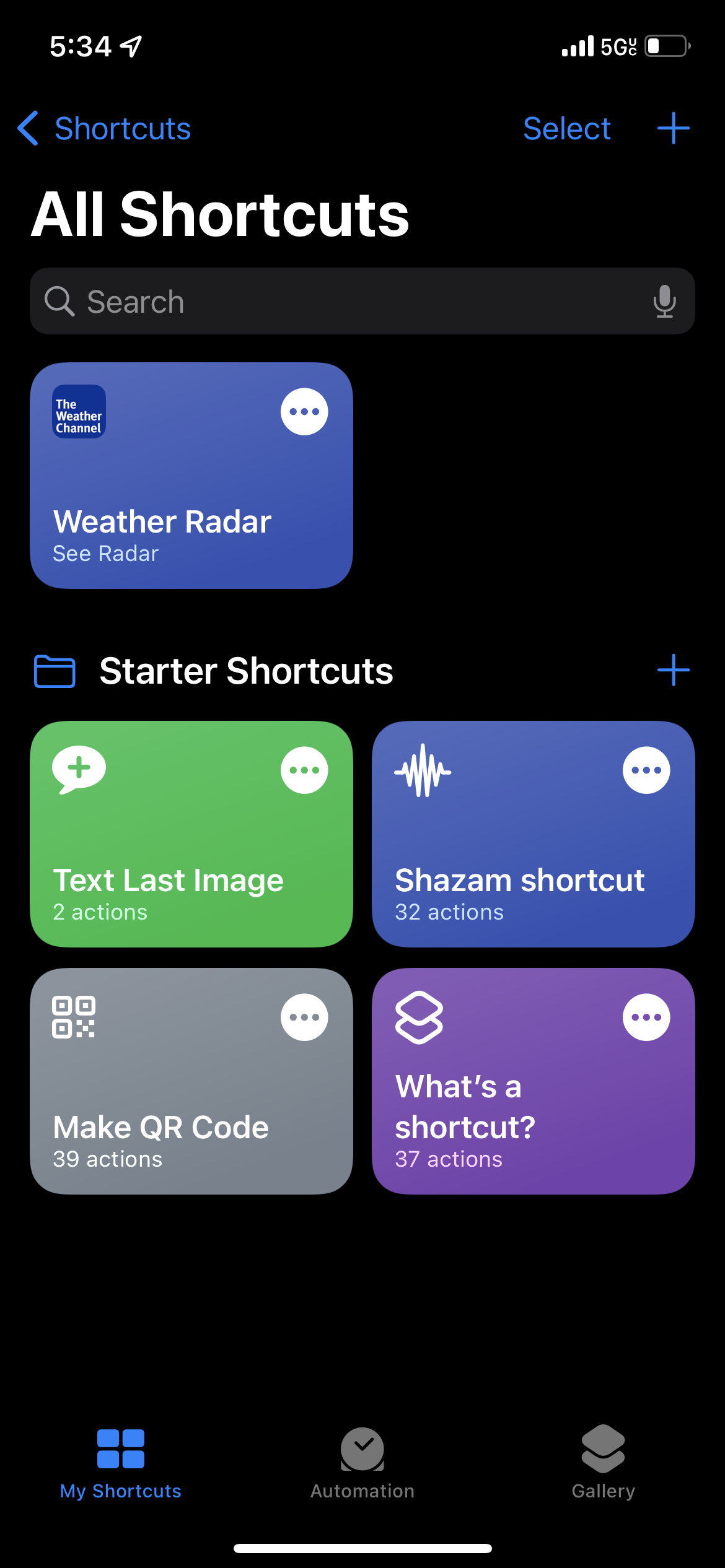
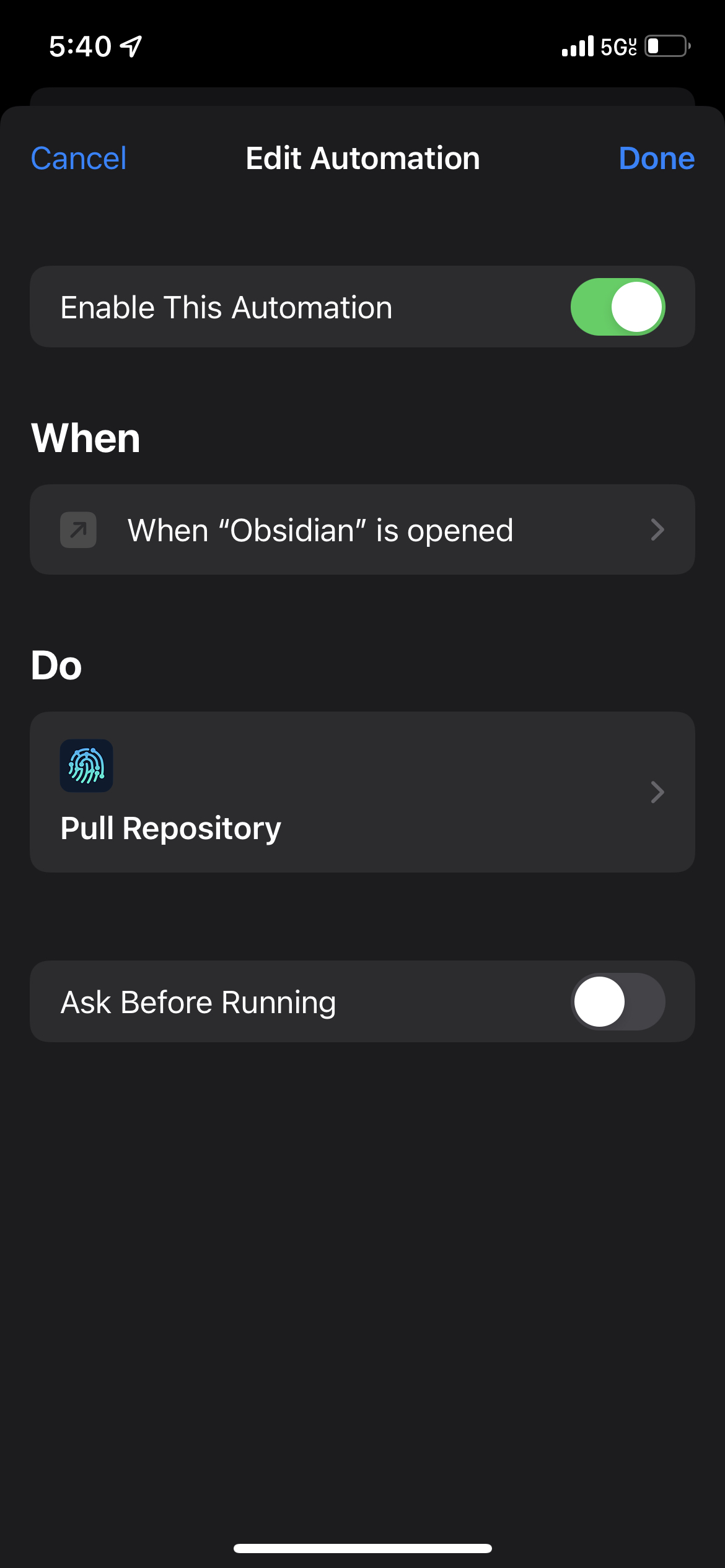
These are manually triggered, short-lived, generally less complex - generally solutions with this were very inefficient and overall felt hacky for example there's no official way to write a loop via shortcuts you have to trick them. The solution turned out to be in a subset of Shortcuts called "Automations". I can't tell you what the formal difference is, but from where I'm sitting the big one seems to be that Automations have a set of triggers that can start them - wait for it - AUTOMATICALLY. So I ended up making an automation that is triggered by the opening and closing of the app. On open, it will pull any changes to ensure we're working with the most updated version of the notes. That automation looks like this:
Intuitively, on close, we want to add, commit and push all the code to the remote repo like so:
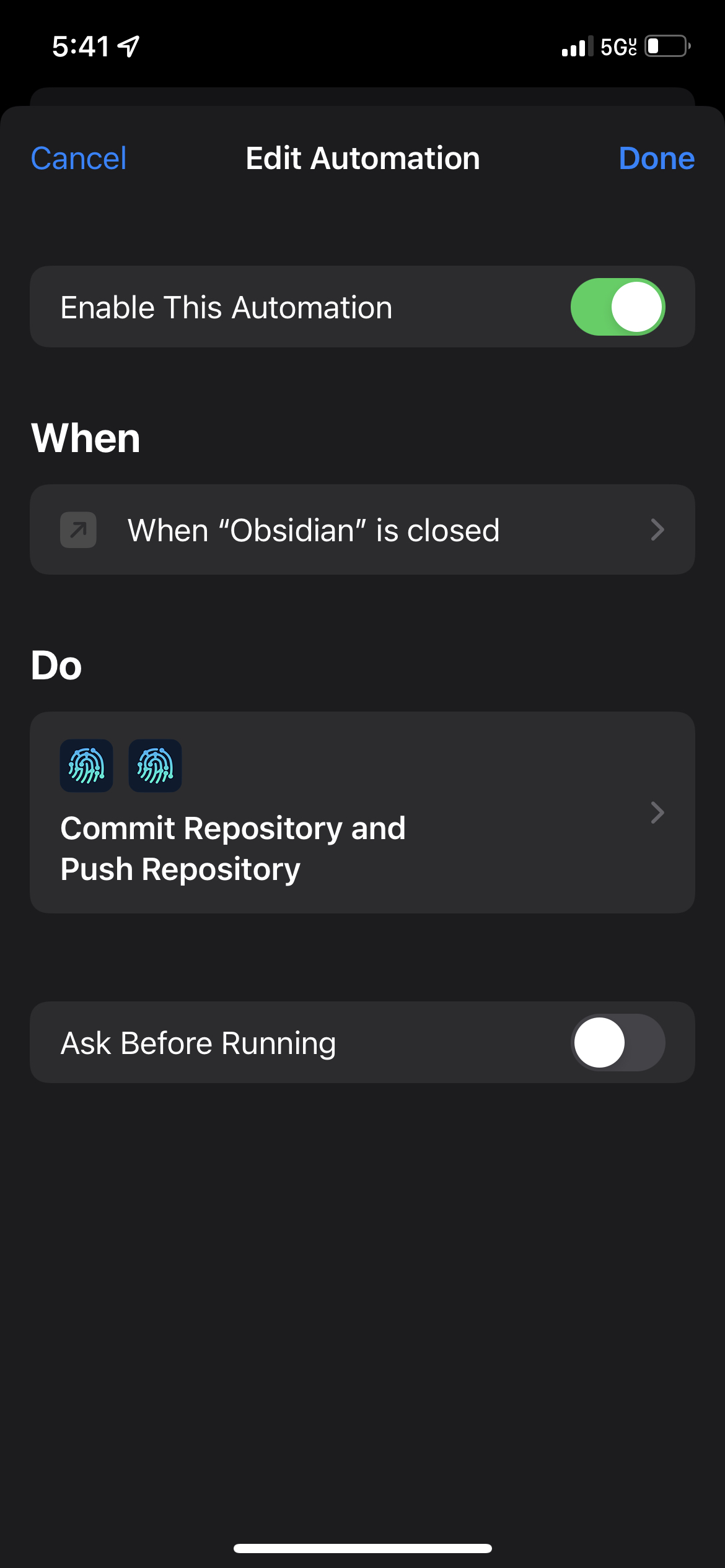
This runs whenever you soft or hard close the app. Make sure for the 'commit' step you write an appropriate commit message template and commit 'any modified files'. This ended up working pretty well - I've been using this for a few weeks now and few to no complaints. You even get a little notification whenever you open and close the app to show you if your automation ran successfully or not which I really like. I've never used Shortcuts before this but after playing around with them a bit for this I have to say I'm really into Shortcuts/Automations and hoping to get more reason to play with them more soon as they're really powerful, efficient and convenient (the death of programmers is coming.)
Drawbacks
So as I said I've been testing this and my other solutions for a few weeks now and overall I'm definitely satisfied, however, compared to iCloud or Obsidian Sync this is clearly more complicated so what are the drawbacks?
-
Merge Conflicts: This is one of the biggest one and is an issue with any Obsidian Git solution not just iOS. They're rare if you're auto-updating often and generally pretty easy to deal with but definitely annoying to basically code review your notes.
-
Efficiency: For the iOS automation specifically, it's hard to measure exactly how taxing this is vs iCloud or Obsidian Sync however my assumption is both those 'formal' solutions are more efficient. Again I didn't notice any actual changes in my device speed or battery life, so I would nt really worry about it but if you have an older iPhone this may be worth considering.
-
Setup Time/Maintenance: The most obvious drawback is you have to read articles like this and maintain your notes yourself! To me, this is a very worthwhile trade off since I really value having complete ownership of my notes however that may not be the case for many.
Conclusion
And that's it! A longer post for sure but I think this is a really valuable topic. Obsidian is a really powerful tool whether you use it with Git or not, useful notetaking in general is a really powerful tool for anyone in virtually any field. Developers/engineers in particular in my experience can almost always benefit from clearing their head-space as much as possible, so I always encourage people to start taking as many notes as possible and get a good system for it.
Even if your notes are a couple random, seemingly useless lines each, future you will be very thankful you took the time. Future you will also be frustrated realizing how much 'simple' stuff they can't seem to remember so make their life a bit easier! I adore Obsidian I may have more posts on Obsidian and how I like to use it in the future as I get more used to it as well, but for now, thanks for reading!
Comments
No comments available :/
Leave your thoughts! 💭
Tags
Git
Obsidian

Version Unavailable
/
unavailable
Copyright 2026 © Naztech Inc. and Daniel Nazarian